





Advanced Groups
Setup Work: MediumNo WipeStable🇺🇸/🇬🇧🇩🇪
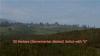
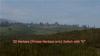
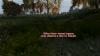
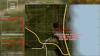

Advanced Groups 150.00€
License Type: One time Payment for 1 Server
Additional DayZ Server Instances are 50€ each
Changelogs:
Version 2.1.1 - stable25.07.2024 23:24
-
fixed compile error with latest Expansion update
Version 2.1.0 - stable03.06.2024 08:25
- Admin Menu for MainConfig
- some Log messages were changed to new SPAM category
- Server Nullpointer when objects were created before some configs were loaded
- Client Nullpointer related to other mods overwriting the chat, causing it to not have the expected widgets present
Version 2.0.7 - stable03.05.2024 16:52
- circles were not calculated properly on some screen resolutions
- groups not saved when the Data folder did not exist
- Left Panel on the Map now stays the same size also on wider screens for a cleaner look
Version 2.0.6 - stable01.05.2024 14:13
-
Fixed a compile error of the config when Dynamic Helicrash Mod was installed
Version 2.0.5 - stable30.04.2024 12:07
For modders to support both old and new Versions of this major update, you can use #ifdef LBmaster_Rework to check if the new version is loaded or the old
- The whole folderstructure changed
- renamed some classes (I tried to rename as few as possible to not break everything)
- No more Prints. All LBLogger methods
- replaced all GetGame() with g_Game methods
- all Menus now inherit the LBMenuBase
- No longer use MissionBaseWorld to pass method calls up the scope
- Plotpole ignore items now take baseclasses
- Made changed to prevent string corruption caused by engine bug https://feedback.bistudio.com/T173348
- remaining plotpole lifetime changed to fully lower flag
- adapted to new Core PBO
- A lot of missing translations
- All Layouts can not be changed with the LayoutManager
- Circle layer can now be changed via script to allow circle intersections and cutting edged for intersecting circles added via script
- config guide comments for automatic config guide generation
- plotpole setting to return the Flag Kit when flag is destroyed
- Upgrade Group Level benefits screen
- Territory config admin page
- Full No Build Zones admin page
- Translation for all admin menus
- a server crash
- a client crash when using the TP Here function
- circles might not be scaled properly when the screen is not 16:9 aspect ratio
- plotpole flags could be cut when attached to flags to grief player bases
- server nullpointer when a player was killed by an AI player
- plotpole positions might be logged on the client exposing enemy base locations
- some Logging prefixes were wrong
- member markers not updating on map menu
- member markers would not stick to player anymore
- GPS was not visible even when enabled
- support for no longer existing KOTH mod
- a lot of dead code
- loads of boilterplate code long replaced by core methods
More...
Features
Group System
-
Highly Optimized and constantly updated to be compatible with other Mods and for the best Server Performance possible -
Clannames & Clantag -
Chat System including Group and Global chat with group tags and custom colors -
Invite Players -
Invite Players for one Serverperiod -
Hierarchy Clansystem with different Ranks -
Subgroups | Firegroups -
Leveling of Groups | Subgroups -
Playerlist & Squadlist -
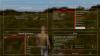
Compass at the top of the screen -
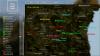
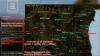
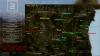
GPS / Minimap -
Groupmembers on Map -
Groupmembers in 3D Ingame -
Groupmembers Logout postion on map -
Groupmembers Logout postion in 3D Ingame -
Playerlist with all Group Members, their health and distance -
Cleanup of inactive Groups (time can be changed in the Server config) -
A lot of settings you can adjust to exactly match your servers needs. Check the Config Guide to see all the config options you can change -
Webhooks for all kinds of events Powerful Adminmenu
-
Overview of all Groups on your Server -
Inspect Each Group -
See all Group Markers -
Change Group name and Tag -
Level up / down any group -
See all Group Members (name and Steamid + easy copy function), promote, demote, kick them or set them as leader -
Delete groups with one click -
Join any group you want (e.g. for support) -
Highly customizable Permission System for each Admin -
Add Static Server Markers Ingame easily -
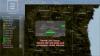
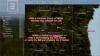
Add Temporary Server Markers Ingame easily Map & Markers
-
Map by LBmaster -
Group Markers -
Private Markers -
Wide range of different and RGB colorised icons -
Various combination of disable/enable Functions of Markers -
High customizable settings (Distance | 3D | 2D) -
Cycle through different 3D visibility presets by pressing K -
Drag Markers to change their positions on the map -
Edit Markers to Change name, Color and icon by double leftclicking the Marker or via the Marker Tab Basic Information Panel
-
Serverlogo -
6x configurable Buttons + Subtext + Hyperlink -
Playercount -
Ingametime -
Servertime (Location) -
Cursor Coordinates Compass & Tactical Ping
-
Tactical Ping with automatic clearing & 1x limitation -
Compass -
Shows Player direction -
Shows Tactical Ping direction -
Custom icon for every player to make it easier to identify who created the ping Client Settings Page
-
Change color of Player Markers -
Change color Compass -
Change color of Playerlist -
Change Chat Position -
Change Playerlist Position -
Toggle GPS, Compass, Streamer Mode, Playerlist etc. -
Change Position of Teammates 3D Marker (Head, Stomach, Feet) -
Change Player 3D Marker (toggle Icon, Name and Distance) -
Change Ping Marker Icon size Chat
-
Groupchat for Groups -
Globalchat -
Option for Default Channel when Client joins -
Auto Censor Bad words from a bad words list in the config (disabled by default) -
Shows Clantags in Chat while writing -
Highlights Ingame Admin & Support messages -
Configure different Groups for Chat (e.g Admin, Support, VIP....) -
Configure different colors for Servermessages and chat -
Admins can mute single players for a specified time or even the whole chat -
Groups can have custom colored Clan Tags (can be set in the Admin Panel) GPS / Minimap
-
Small Minimap centered on the player -
Player Marker shows direction of the player -
Option to display Coordinates, Direction (0° - 360°) and current Speed -
Configure if an Item (like Compass) is required to have the GPS open -
Configure if the should be a GPS present in vehicles like Cars -
Force GPS to only work in vehicle to help players navigate -
Change size of the Minimap in Client Settings -
Minimap shows all Markers, which are visible on the 2D Map -
Toggle GPS by pressing B Clanclothing
-
Clan Clothing -
System which automatically assigns a player his Clanclothes -
Automatically changes the texture if a external player wears the Clanclothes -
Works with all items, that can be retextured and can be picked up by a player DLC - Flag Pole Extension
-
Extension for the Vanilla Flagpole (no new item is added) -
Change the Radius player can build (Cylinder shaped radius) -
Restrict access only for Group Members -
Players with lower ranks cannot build in the area -
Hostile Players cannot build (if configured) -
Add exceptions e.g. for C4 -
Force Players to build a Flagpole before being able to build basebuilding objects -
Option to enable instant build of the Flagpole -
Option to automatically add a Flag and raise the Flag when Flagpole built -
Automatically add a new Marker on the Map when Flagpole placed -
Allow admins to bypass any build restrictions -
Compatible with BBP (disable BBP builtin territory System !) Planned DLC - Panels (WIP)
-
DLC - Panels -
Playertab with Playerinformations -
1x Information Tabs to show Rules & more
<
>